



Business Account

Set Up a Business Account with VR Expert

A VR Expert business account is for organisations that buy, roll out and support AI glasses, smart glasses and XR hardware at scale. It combines ordering on credit, bundles and stock held with VR Expert and central repair and refurbishment with one online portal for the whole team.

For companies, schools, hospitals, public organisations and resellers. Every colleague logs in with their own work email and sees the same, up-to-date orders, devices and invoices.

  • Kiyoh9.2/10100+ Reviews
  • ISO 9001:2015
  • Google4.8/5500+ Reviews

Business account

What a Business Account Includes

Buying, deploying and supporting XR hardware across an organisation, arranged under one account with VR Expert.

  • Prepare for Scale

    Set up for rollouts across teams, sites and countries, from a first pilot to a full fleet of devices.

  • Order on Credit

    Order on invoice within an agreed credit limit, with outstanding and overdue amounts visible in the portal.

  • Build Bundles and Packages

    Combine glasses, software, accessories and services into bundles and packages that match how you deploy.

  • Hold Stock and Manage Partner Inventory

    Keep stock with VR Expert and manage your partner inventory, so devices are ready to ship when they are needed.

  • Manage Service Instructions

    Record how devices are prepared, shipped and serviced, so every order and service job follows your instructions.

  • Centralised Repair and Refurbishment

    One repair centre for all your devices: follow each repair, approve offers per device and get refurbished devices back into use.

  • Work Together with Your Team

    Invite colleagues from finance, IT and operations. Everyone has their own login, and admins decide who can manage users.

  • Set Up a Business Account

    Our team sets up the account with your company details, credit terms and delivery locations.

The business portal

One Portal for Orders, Devices and Invoices

Every business account comes with the portal. It shows orders, shipments, devices, licences, returns and invoices straight from our systems, so the information is always current.

  • Orders

    Your full order history with status, PO number and shipment date. Re-order in a click.

    See how it works
  • Shipments

    Every parcel with its delivery address, contact and a live track & trace link.

    See how it works
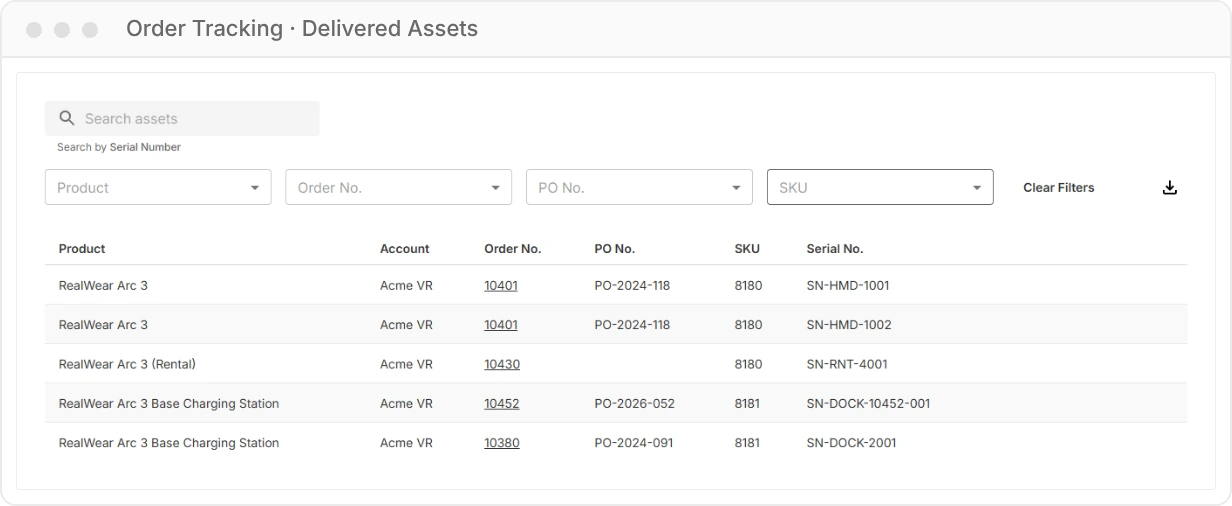
  • Delivered Assets

    Each device you received, with product, SKU and serial number. Export it as a CSV.

    See how it works
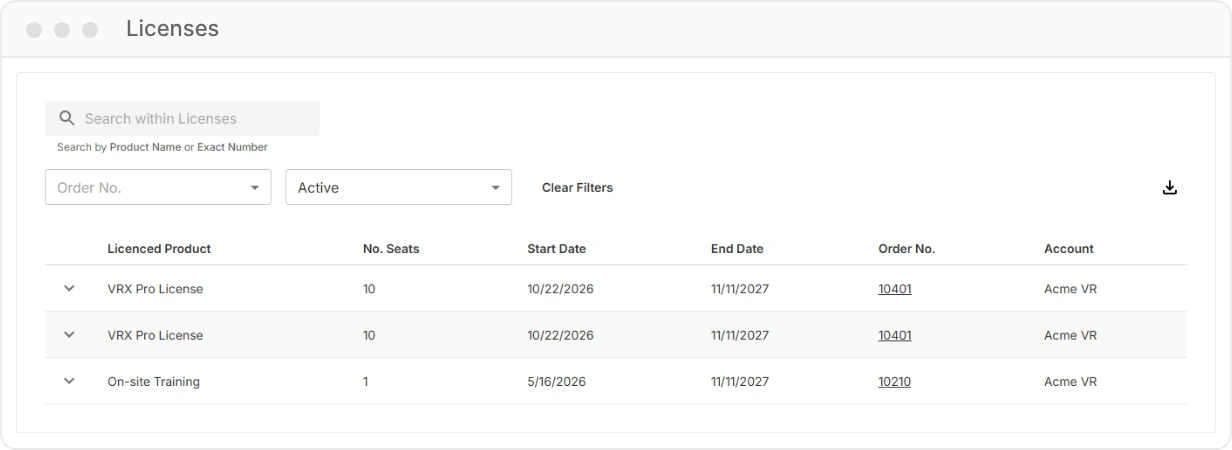
  • Licences

    Software and service licences with the number of seats and their start and end dates.

    See how it works
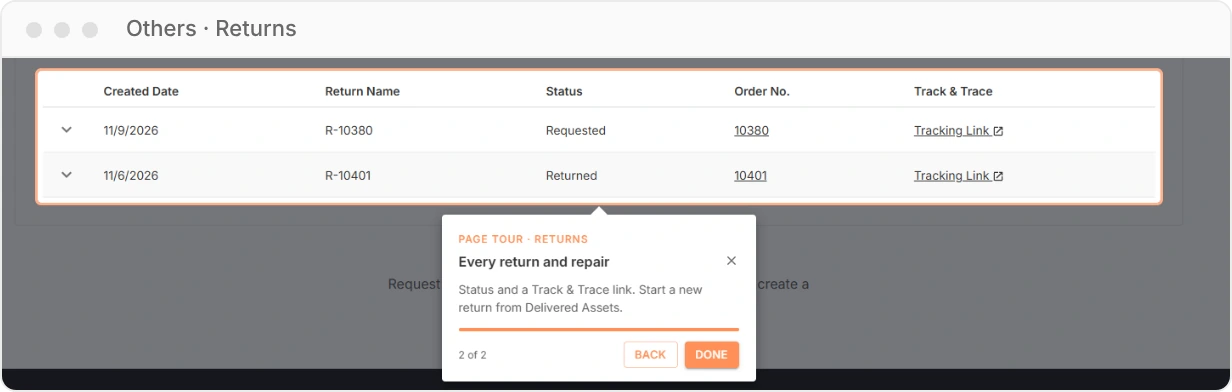
  • Returns and Repairs

    Start a return from the order and follow it, or a repair, until the device is back.

    See how it works
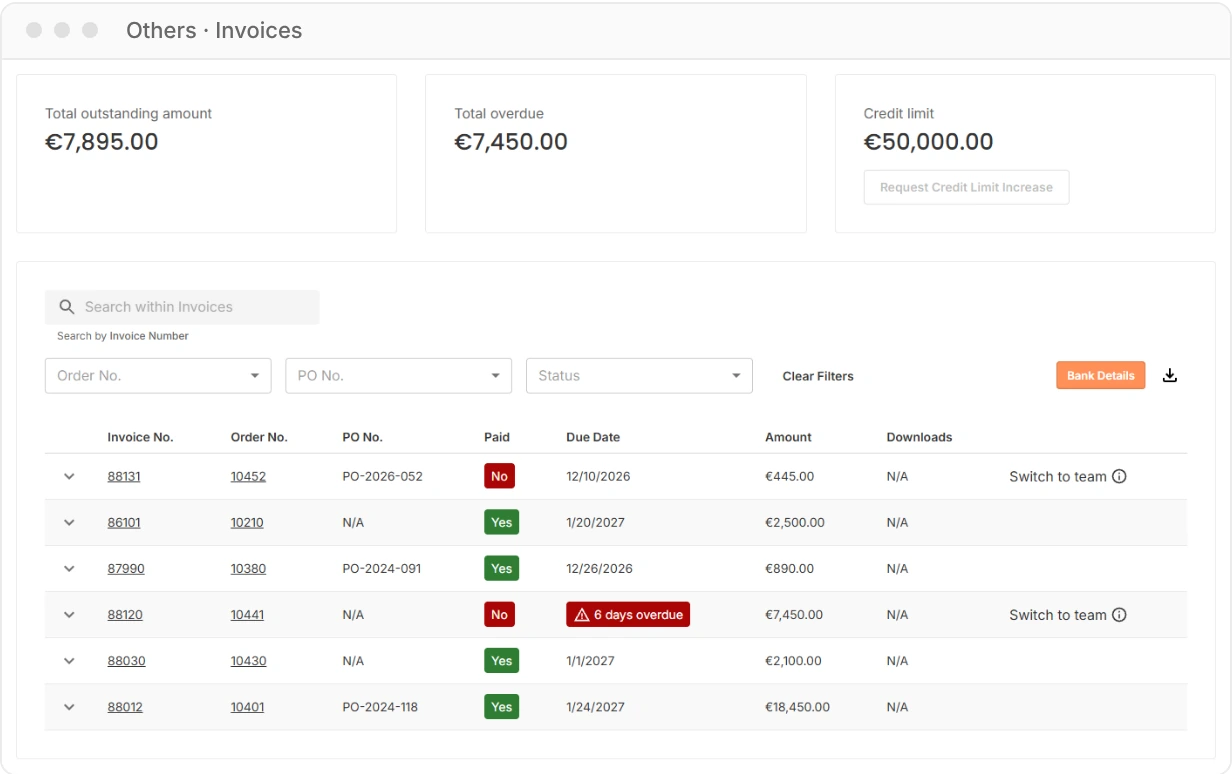
  • Invoices

    Outstanding and overdue totals, invoice downloads and online payment.

    See how it works
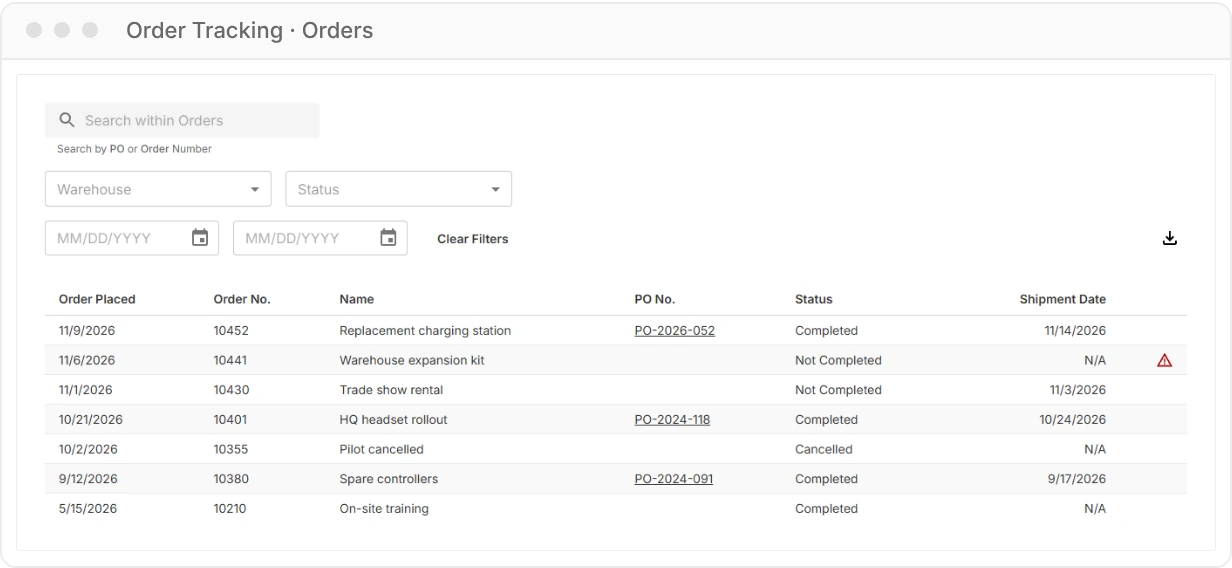
Orders list with search, warehouse, status and date filters and a table of orders with PO numbers, statuses and shipment dates

Orders

Order Overview and Re-ordering

See all orders your company placed with VR Expert, from a single replacement part to a fleet rollout. Search by order or PO number, filter by warehouse, status or date, and export the list for your own reporting.

  • Status, PO number and shipment date per order
  • Order details with delivered quantities, invoices and a Re-order button
  • Request a return or contact us straight from the order
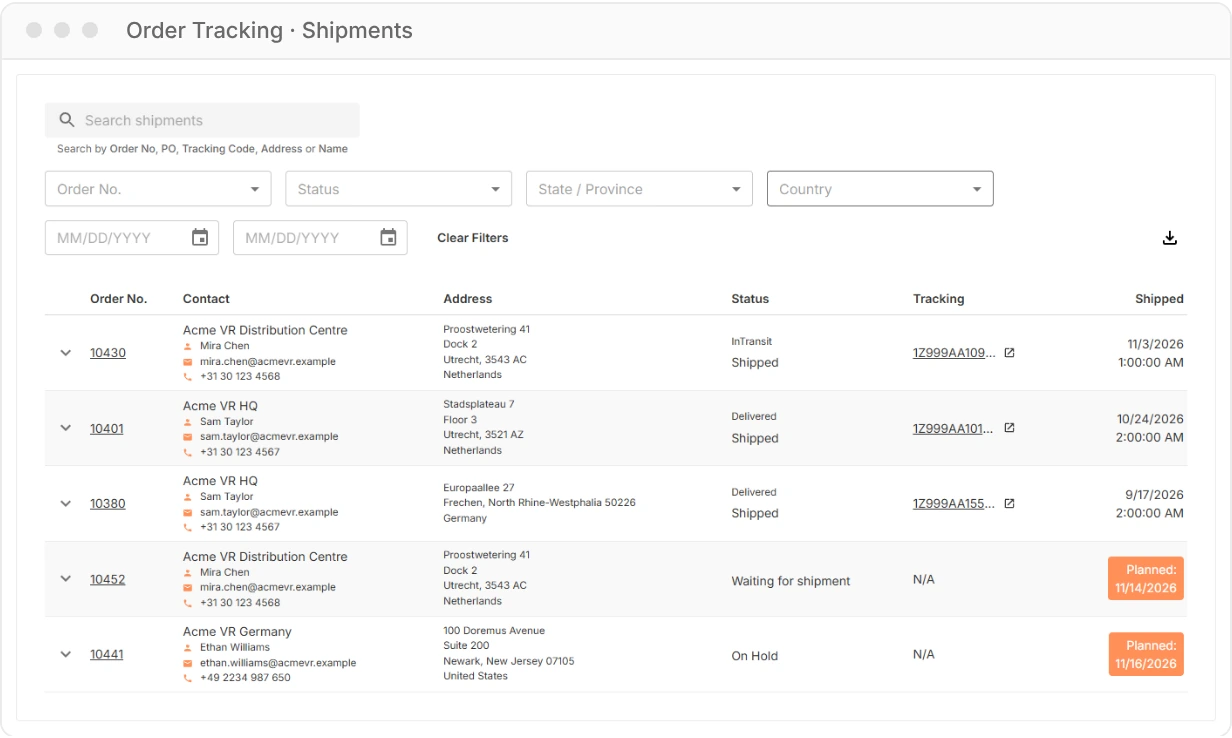
Shipments list showing order numbers, delivery contacts and addresses, shipment status, tracking codes and planned dates

Shipments

Shipment Tracking per Location

Shipping to several offices, schools or sites? Each shipment shows where it goes, who receives it, its status and a track & trace link. Orders that ship in parts show every parcel separately, so nothing gets lost between locations.

  • Status from order received to delivered
  • Planned shipment dates and on-hold reasons
  • Packing slips, packing details and installation instructions
Delivered assets list with product, account, order number, PO number, SKU and serial number for each device

Delivered Assets

Device and Serial Number Register

Need a serial number for a support case, an insurance claim or your IT asset register? Delivered Assets lists every device we delivered to you, including rentals, linked to the order and PO it came from.

  • Search by serial number
  • Filter by product, order, PO number or SKU
  • Export the full list as a CSV
Licences list with licensed product, number of seats, start and end date, order number and account

Licences

Licences with Seats and End Dates

Device management, software and service licences sit next to your hardware. See how many seats you have, when each licence started and when it ends, so you can plan renewals before your team loses access.

  • Seats, start date and end date per licence
  • Filter active and expired licences
  • Linked to the order it was bought with
Returns list with created date, return name, status, order number and a track and trace link, with a page tour tip explaining the list

Returns and Repairs

Returns and Repairs

Start a return from the order the device came with, then follow it from requested to completed, with its own track & trace link. For repairs, you follow each device from the moment it arrives at our repair centre; once our technicians have checked it, you see the offer in the portal and decide what happens to each device.

  • Request a return from the order in a few clicks
  • Status and tracking for every return
  • Repair offers per device, approved by you
Invoices page with total outstanding, total overdue and credit limit, and a list of invoices with paid status, due dates and amounts

Invoices

Invoices, Credit and Payments

See your total outstanding and overdue amounts at a glance, find any invoice by its number, order or PO, and download invoices and receipts. Pay online, or open the bank details if you prefer a transfer.

  • Outstanding, overdue and credit limit in one view
  • Pay online by card and other methods, or by bank transfer
  • Filter by paid status and export to CSV
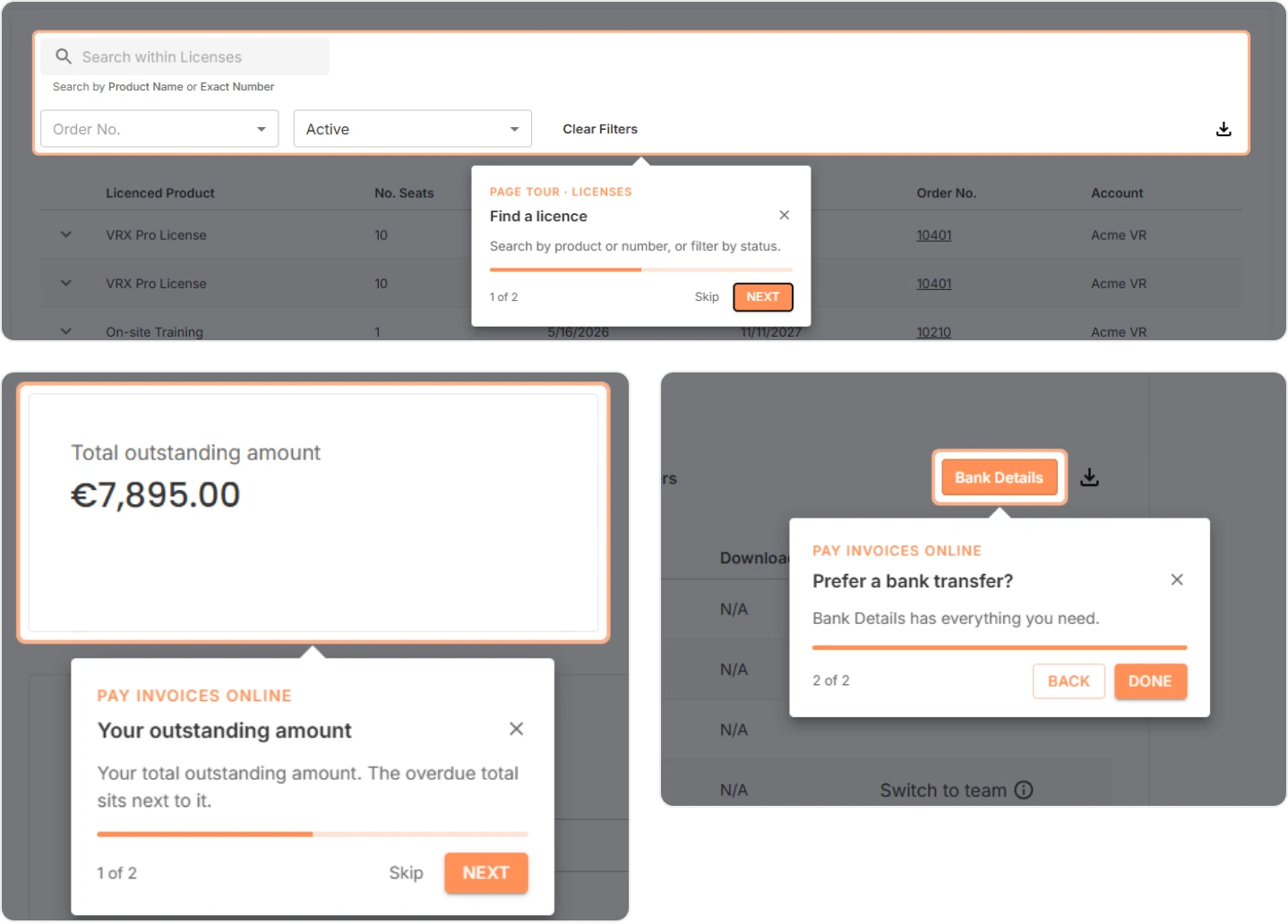
Page tour tips in the portal: finding a licence, the total outstanding amount and the Bank Details button for a transfer

Guided tour

Guided Page Tours

New to the portal? Short page tours point out what matters on each page: where to search, what the columns mean and which button to use. Skip them when you know your way, and replay them any time from the help icon in the top bar.

  • Two or three tips per page, no manuals to read
  • Quick links to sales, the knowledge base and support on the home page
  • Our support team one click away from every page

Get started

Set Up a Business Account in Three Steps

Use the work email address you order with. That email links your login to your company's orders, devices and invoices.

  1. Request a Business Account

    Contact your VR Expert account manager or our sales team. We set up the account with your company details, credit terms and delivery locations.

  2. Activate Your Login

    Accept the invitation or sign up with your work email, verify your address and choose a password. You land straight in your company's portal.

  3. Invite Your Team

    Portal admins add colleagues from finance, IT or operations and choose who can manage users. Everyone logs in with their own email.

Not a VR Expert Customer Yet?

Talk to our team about a business account for AI glasses, smart glasses or XR hardware in your organisation.

Plan an Introduction Call