Design and Comfort: Inconspicuous and Lightweight
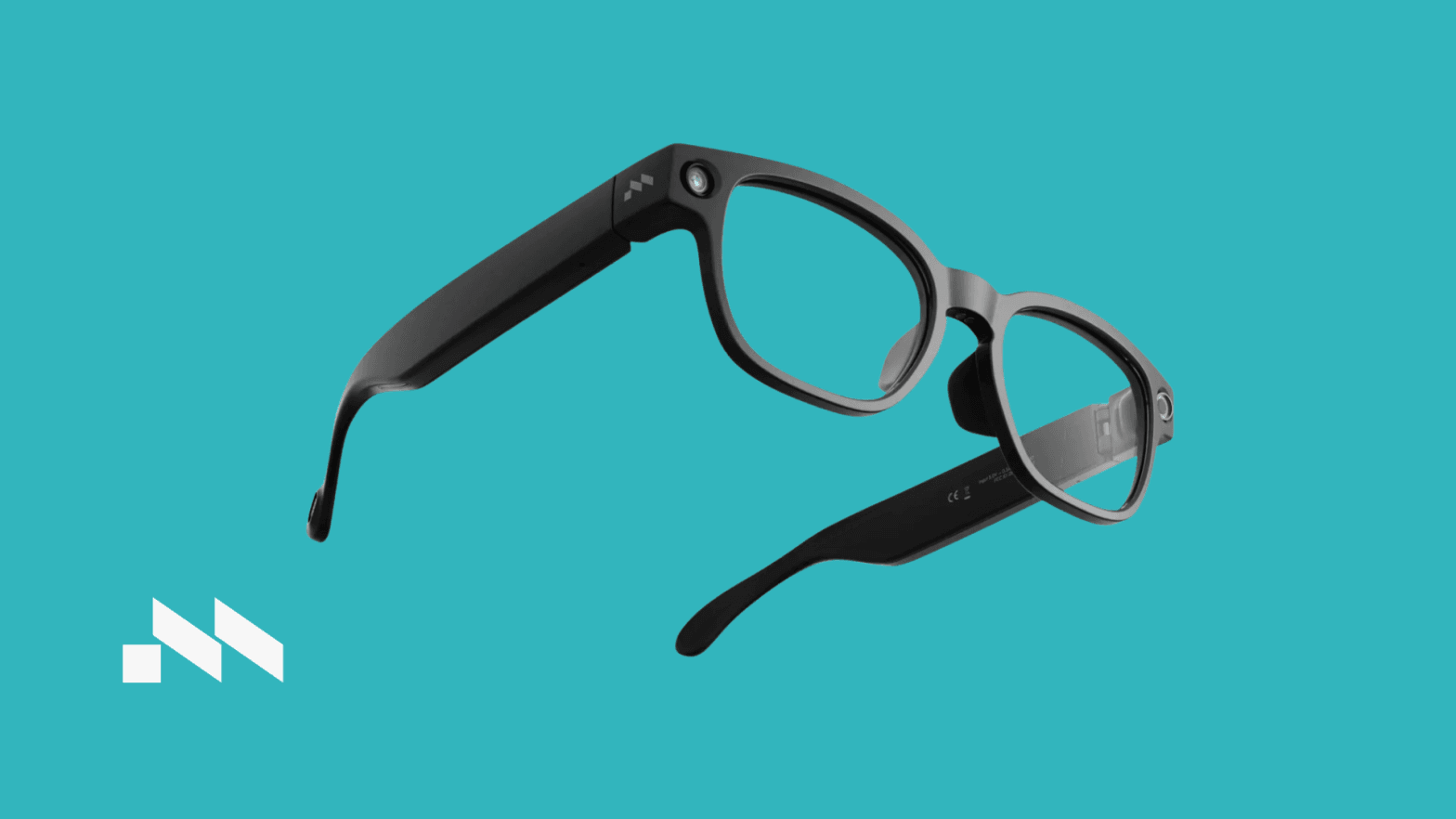
At first glance, the Mentra Live looks exactly like a premium pair of classic, matte-black lifestyle frames. Weighing in at just 43 grams, it is light enough to wear for a full 8-hour workday without experiencing pressure on the bridge of the nose or behind the ears.
Unlike heavy AR headsets that pack bulky optics, the Mentra Live is a display-less smart wearable centered entirely around audio, capture, and AI features. The electronics are neatly integrated into the frame arms, keeping the overall aesthetic clean, minimalist, and completely natural for daily wear.
Key Feature: Open POV Livestreaming
The standout feature of the Mentra Live hardware is its front-facing 12MP camera, which boasts a 112-degree wide-angle field of view. The device takes a highly versatile approach to connectivity and streaming.
By pairing the glasses with the Mentra App on your smartphone, you can activate the Streamer mode to broadcast a first-person perspective directly to platforms like YouTube and Twitch. The camera captures in a natural landscape orientation, making it an incredible asset for content creators, vloggers, and on-site technicians broadcasting live technical feeds.
How to Connect: Pairing Mentra Live with the Mentra App
Setting up the ecosystem is straightforward and takes less than two minutes. Follow these quick steps to sync your hardware with the software:
- Prepare your Phone: Ensure both Bluetooth and Wi-Fi are enabled on your smartphone, then open the Mentra App.
- Activate Pairing Mode: Press and hold the physical capture/pairing button located on the inner side of the right frame arm for about 3 seconds until the internal LED indicator starts blinking.
- Link the Devices: Tap "Add Device" inside the Mentra App. The software will automatically scan, detect the Mentra Live chassis, and establish a secure dual Bluetooth/Wi-Fi connection for seamless media streaming and data syncing.
Ecosystem Integration via the Mentra App
The true capabilities of the hardware are unlocked through MentraOS and its companion app. The Mentra App acts as a centralized dashboard and an ecosystem hub, featuring a modular mini-app ecosystem:
- Mentra AI & Smart Notes: Utilizing the glasses' directional, noise-canceling dual-microphone array, you can dictate thoughts on the go. The app transcribes the audio locally with impressive accuracy.
- Live Translation Support: When paired with external heads-up displays or audio receivers, the software facilitates real-time translation pipelines, making cross-lingual communication smooth and intuitive.
- Media Synchronization: Media offloading from the glasses to the app via Wi-Fi/Bluetooth is fast, allowing quick access to raw footage for editing or instant sharing (click here to know more about the app).
Pros and Cons: A Real-World Breakdown
To give you a clear look at what to expect, here are the main advantages and drawbacks we encountered during our week of testing:
Pros
- True Form Factor: At 43g, it successfully mimics standard optical eyewear, preventing facial fatigue during long sessions.
- Platform Freedom: Unrestricted POV livestreaming to mainstream platforms like YouTube and Twitch expands utility for creators and businesses alike.
- Exceptional Battery Ecosystem: Delivering 11 to 12 hours on a single charge, plus an additional 50 hours from the charging case, it sets a high standard for standalone endurance.
- Modular Software: The mini-app store model inside the Mentra App allows users to download only the specific AI and productivity features they need, keeping the interface clean.
Cons
- Thermal Buildup: Due to the ultra-compact integration of the chipset and battery inside the slim chassis, the two frame arms (temples) can get noticeably warm to the touch during extended high-definition livestreaming or continuous recording sessions.
- No Visual Overlay (Display-less): There is no heads-up display or transparent screen in the lenses. All visual feedback, settings, and media reviews must be handled via your smartphone.
- Network Dependency: Because high-definition POV livestreaming relies heavily on real-time data transmission, the streaming quality is bound to the stability of your local Wi-Fi or mobile cellular network.
- Initial App Synchronization: While the hardware responds instantly, heavy data transfers like offloading long, high-resolution videos can occasionally experience minor bandwidth lag on older smartphone models.
Hardware & Software Performance Metrics
Feature | Real-World Performance | Verdict
Form Factor & Ergonomics | 43g weight; distributed balance; comfortable for prolonged daily wear. | 9/10
Camera & Video Quality (12MP) | Sharp, stable 112° wide-angle POV video in standard landscape format. | 8.5/10
Battery Endurance | 11 to 12 hours of mixed standby, audio playback, and capture. Charging case provides an additional 50 hours. | 9.5/10
Companion App Stability | Seamless media syncing; active firmware updates continuously refine background connectivity. | 8/10
The Verdict
The Mentra Live smart glasses offer a refreshing, highly capable approach to wearable technology. By combining a lightweight, fashionable camera chassis with the flexible app ecosystem of the Mentra App, it successfully bridges the gap between everyday lifestyle wear and professional content tools. For creators and enterprises looking for a standalone, hands-free streaming tool, it is a highly competitive and reliable option.
The Mentra Live is currently available for hands-on demonstrations at the VR Expert office. Contact our team today to schedule a demo and see how wearable AI can optimize your workflow.
Want a livestream-ready wearable your team can start using today? VR Expert AI stocks the leading AI glasses for business and supports pilots and rollouts across the EU and US.