Executive summary
This HTC VIVE Eagle review finds a useful everyday wearable for hands-free capture, audio and occasional translation, with a more qualified case for business deployment. Setup was straightforward, the companion app worked well, and the battery lasted through a day of mixed testing. The main weakness was the experience around more complex AI questions and live conversation translation, where delayed responses and overlapping speech interrupted the flow.
VIVE Eagle has no built-in display. Its value comes from the camera, speakers and connection to a smartphone. For companies, the most promising starting points are short multilingual interactions, first-person documentation and convenient access to supported phone-assistant functions. Prescription fitting also matters: employees who need corrective lenses may need individually assigned pairs.
Our recommendation is to start with a focused pilot. Check the exact languages, subscription allowance and work-phone behavior before committing to a wider rollout. It is worth considering as a personal productivity accessory, but our early experience does not support treating it as a dependable replacement for an interpreter or a complete enterprise workflow device.
VR Expert assessment: the strongest case is a specific everyday task, tested with the intended employee.
What is HTC VIVE Eagle
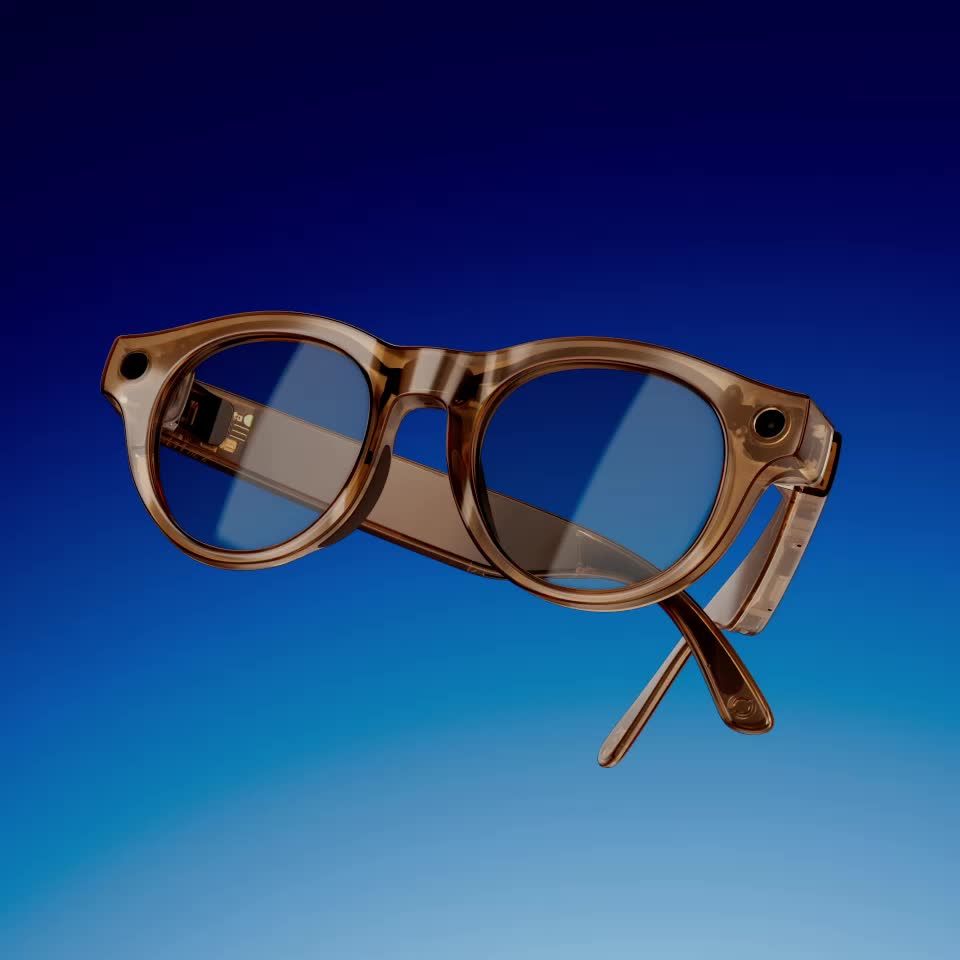
HTC VIVE Eagle combines a camera and open-ear audio with AI services accessed through VIVE Connect. There is no digital image projected into the lenses, so users cannot read in-lens captions, see a virtual desktop or follow visual work instructions. That distinction matters when comparing it with display-equipped smart glasses. HTC’s current product information describes both visual translation and spoken conversation translation. [1]
For the round black photochromic configuration, see the HTC VIVE Eagle product page. The right buying decision starts with the task and lens configuration, rather than the AI label alone.
Key specifications
Processor / memory:
- Snapdragon AR1 Gen 1
- 4 GB RAM
- 32 GB storage
Camera:
- 12 MP
- Photos 3024 × 4032
- Video 2176 × 2944 at 30 fps
Battery:
- 235 mAh
- Up to 4.5 hours continuous music
- Over 3 hours calls
- Over 36 hours standby
Lens options:
- ZEISS UV400 sunglasses
- UV400 Blue Light Blocking
- UV380 AdaptiveSun
- Product type / display: Camera and audio AI glasses; no in-lens display
- Audio / microphones: Two open-ear speakers; four microphones
- Controls: Voice, touchpad, capture button and power/AI button
- Connectivity: Bluetooth 5.3 and Wi-Fi 6E
- Phone compatibility: Android 10 minimum or iOS 17.6 and later; VIVE Connect
- Weight with lenses: Pantos round frame 48.5 g; square frame 49 g
- Charging: Magnetic cable; stated 1 to 50 percent in 10 minutes
- Protection: IP54
- US price reference: HTC store lists the range from $499; configuration and retailer pricing vary
Sources: HTC US specifications and store. These are published specifications, not measurements from our test. [2, 3]
An everyday wearable with a phone at the center
The phone dependency is important, but it needs a precise explanation. HTC says button-operated photography and video capture can work without opening VIVE Connect. Files can be imported later. VIVE AI tasks require a connection to VIVE Connect and internet access on the phone. [4]
For a business user, that makes the glasses an extension of a mobile setup. A company issuing them should check both the eyewear and the paired phone, including permissions, connectivity and the account the employee will use.
Design and lenses matter as much as the electronics
The range offers round Pantos and square frames. For professional use, lens choice is the more consequential distinction. A pair worn mainly indoors has a different job from one used during outdoor visits or frequent transitions between buildings.
Lens types from HTC’s specifications. These are selection considerations, not measured optical performance. [2]
Prescription fitting changes the sharing model
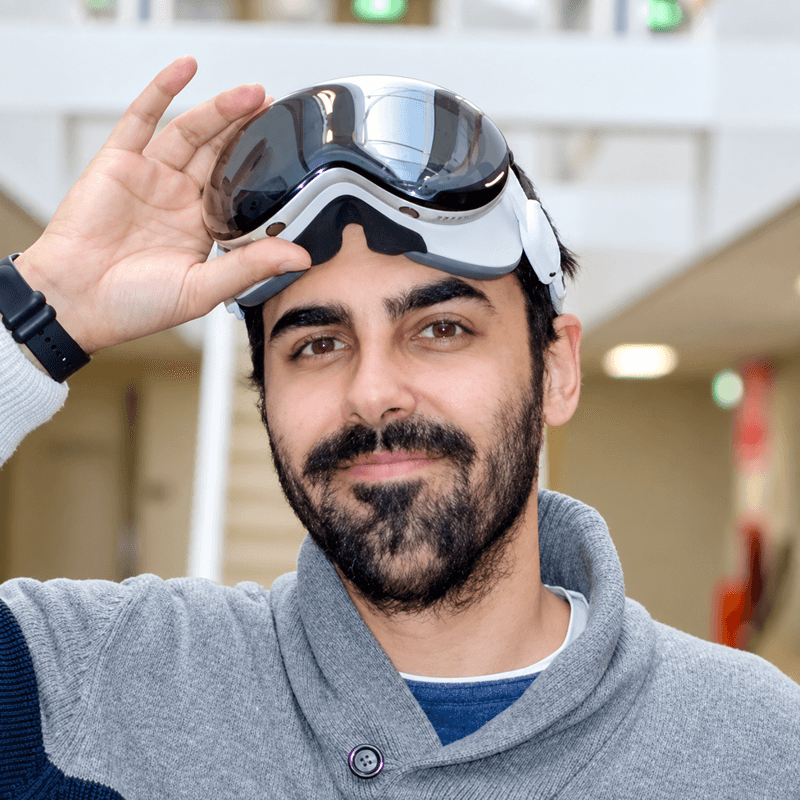
My test unit did not have my prescription, which made it difficult to see clearly while wearing it. This is an optical-fit issue rather than a display-readability issue: VIVE Eagle does not have a display. I would want the correct lenses before reaching a firm conclusion about everyday visual comfort.
For a company, that is a practical procurement issue. Employees who depend on prescription lenses may need their own fitted pair, rather than borrowing the same unit from a shared pool. That adds fitting time and optical costs, and it changes how easily a device can be reassigned. It does not mean every employee automatically needs a personal pair, but prescription users should be considered from the start.
HTC confirms that a qualified eye-care professional can replace the lenses with prescription lenses. Confirm compatibility, fitting and the available lens treatments with the supplier for the selected frame. [5]
Setup and the VIVE Connect app
Setup was one of the strongest parts of my experience. VIVE Connect was easy to follow, the glasses connected quickly, and the app worked well throughout my testing. I did not feel that getting started required specialist technical knowledge.
HTC’s setup guide takes users through account sign-in, Bluetooth pairing, confirmation on the glasses, available updates, voice setup and permissions. [6] The guided process is helpful for introducing employees to a wearable they have not used before.
A smooth first setup is encouraging, although it does not establish that hundreds of devices can be centrally managed. For a larger project, onboarding and ongoing administration should be evaluated separately.
Camera and audio in everyday use
Taking photos and recording video was straightforward. I could use the capture button or ask the assistant, and the results looked good for the everyday situations I tested. The benefit is convenience: it is easier to record a moment from your own viewpoint when you do not have to hold up a phone.
That could be useful for documenting a demonstration, capturing a visual reference during a visit, or collecting short first-person clips. I have not yet tested whether small technical labels remain readable across different lighting conditions, or whether the camera meets a particular inspection standard. Those are separate requirements from producing a good-looking everyday image.
Music also became part of my day with the glasses. Open-ear playback makes audio an easy background function while other features are used occasionally. My testing does not yet establish performance in noisy workplaces, microphone quality during difficult calls or how much nearby colleagues can hear.
The AI assistant is better at simple requests
Basic questions, such as asking about the temperature or the tallest mountain, were a reasonable fit. More complex questions were less convincing. In my initial experience, the assistant did not consistently feel capable enough for longer or more demanding exchanges.
I therefore see its current value in quick requests with a clear outcome. Taking a photo, asking a short question or translating visible text is easier to judge than asking an assistant to reason through a complicated work problem. My impression is based on the configuration I tested, rather than a controlled comparison of every available AI model.
VIVE AI and the phone assistant have different roles
HTC offers AI services using Gemini or OpenAI GPT, subject to availability. Separately, VIVE Eagle can invoke a supported smartphone assistant. Access to a model through VIVE AI should not be read as automatic access to an employee’s Google Workspace account or personal chatbot history. [1, 7]
The phone connection is the part I find especially interesting for work. Calendar checks, reminders and navigation could make the glasses more useful between meetings or during visits. HTC documents linking Google Assistant to supported phone apps and enabling the relevant settings; iPhone behavior relies on Siri settings. [7]
Email sending, purchasing and access to a managed work calendar should be tested on the actual company phone and account. I would not promise those actions from the glasses alone. Their availability depends on the phone assistant, connected apps and account permissions, and they are not established by the basic VIVE AI question-and-answer experience.
Live translation has potential but timing needs work
Translation is the feature I find most promising for business. It addresses a recognizable problem for colleagues, visitors and customers who do not share a fluent language. In practice, however, understanding the words is only part of the experience. The translation also needs to arrive at the right time.
In several of my tests, the translated voice started while we were still speaking. At other times there was a delay. The feature worked, but the interruptions made the conversation less natural. I would currently approach it as help for short exchanges where both people can pause, rather than assume it will keep up with a fast discussion.
Visual translation and live speech translation are different functions. Live translation is started and configured on the phone. [8, 9]
How the translation modes differ
Visual translation uses captured text, such as a sign or printed document. Live translation handles speech. In VIVE Connect, users open Live translation, select input and output languages, choose Conversation or Listening mode, and set the playback device. Conversation mode is intended for an exchange; Listening mode handles ongoing speech. [8, 9]
That matches an important limitation in my testing: I needed the phone to start live translation. Once running, audio delivery through the glasses is convenient, but the overall workflow is not entirely hands-free.
For a useful trial, compare a short visitor conversation with a longer presentation. Check whether names, numbers and specialist terms survive translation, how frequently speakers have to stop, and whether the other person finds the exchange comfortable. These results matter more than the headline language count. Browse translation glasses for business if this is the main reason for buying.
Subscriptions and the actual cost of translation
The limited access available during my test should not be described as permanently free translation. HTC currently advertises 24 complimentary months of VIVE AI Plus with VIVE Eagle. The US plan page lists the following terms, checked on October 13, 2026. [10]
VIVE AI Plus:
- US advertised terms: $2.50/month with annual billing or $2.99 monthly; advertised 24-month inclusion
- Translation allowance: 12 languages; 100 monthly credits
VIVE AI Pro:
- US advertised terms: $5.80/month first-time annual offer or $6.99 monthly; renewal price may differ
- Translation allowance: 90+ languages; 400 monthly credits
Live translation uses one credit per minute. Other credit-consuming features share the allowance, so 100 or 400 credits should not be treated as unlimited translation. Taxes, eligibility and renewal terms need checking in VIVE Connect. [10]
For example, a hypothetical employee using live translation for 20 minutes on each of 20 workdays would use 400 credits for that feature alone. A buyer should therefore estimate translation time, not just count the languages needed. This is particularly relevant if a pilot grows into routine customer-facing use.
Battery life during a day of mixed testing
Battery life was a positive part of my experience. I wore the glasses through a day, listened to music, asked questions, translated images and took photos. The battery lasted through that mix of use.
That is an observation about intermittent testing, not a measured full-shift runtime with continuous translation or recording. These initial test notes do not include exact active minutes, remaining charge or a controlled discharge test. A role involving frequent capture and translation needs its own battery trial before a company sets expectations for employees.
Additional features worth testing next
The functions I used most were questions, capture, music and translation. HTC also documents VIVE AI Notes: recording conversations and importing them into VIVE Connect for transcripts and summaries. Its support guide describes recordings up to two hours. I have not yet evaluated transcription accuracy, speaker handling or summary quality. [11]
Meeting notes could strengthen the business case if they reliably preserve actions and decisions. The next useful test would compare the output with a manually checked account of a short meeting, including names and follow-up tasks. Advertised support is a reason to test the feature, not evidence that it already meets that requirement.
Where VIVE Eagle fits in a business
- Visitor and customer conversations: Promising for short, low-stakes exchanges; test turn-taking and the required languages.
- First-person documentation: Useful for quick visual references and short clips; assess detail before relying on inspection images.
- Mobile productivity: Potential through supported phone-assistant actions; verify work-account behavior.
- Meetings and interviews: AI Notes merits a separate trial; transcription quality is not covered by this test.
- Visual instructions and captions: No built-in display, so it cannot present instructions or captions in the wearer’s view.
Privacy protections and deployment questions
HTC describes encryption, de-identification of AI queries and ISO/IEC 27001 and 27701 coverage for VIVE AI. Those standards concern information security and privacy management. They do not mean every company workflow is automatically approved. HTC’s security whitepaper is a useful starting point for an IT review. [1, 12]
A company should establish what information may be captured, where AI processing takes place, and how recordings and accounts are handled when an employee leaves. Cloud-dependent functions should not be presented as fully offline or as keeping every piece of information on the glasses.
The public materials reviewed here do not establish a complete VIVE Eagle fleet-management setup, custom-app deployment route or company-wide identity integration. Treat these as questions to resolve with the supplier. A successful individual trial and a manageable fleet are different purchasing milestones.
Pros and cons from our initial review
- Straightforward setup and a reliable app in our test: More complex AI questions were less convincing
- Convenient photo and video capture with good everyday results: Translation could overlap speech or arrive late
- Battery lasted through a day of mixed testing: Continuous workday runtime was not measured
- Useful combination of audio and occasional translation: Phone required for AI and starting live translation
- Prescription lenses can be fitted: Personal fittings complicate shared-device use
- Potential through connected phone-assistant tasks: No display; subscriptions and usage credits affect value
HTC VIVE Eagle review verdict
I would consider VIVE Eagle for a company that wants to test translation and hands-free capture in everyday work. Setup and daily use were easy enough that the hardware did not feel like a barrier. The camera, music playback and mixed-use battery experience gave it practical value beyond the assistant alone.
My strongest business interest remains translation, but the timing needs to improve before I would depend on it for fluid professional discussions. The phone-assistant connection could broaden its usefulness, particularly around schedules and navigation, once the actual work account and apps have been verified.
It is best suited to an individually fitted pilot for mobile staff, visitor-facing teams or employees who need quick first-person capture. It is a weaker choice when the essential requirement is in-view information, dependable complex AI reasoning or a confirmed enterprise application and management stack.
Compare ordinary camera-and-audio smart glasses for capture and voice convenience. Compare display-equipped products, including the Meta Ray-Ban Display category, when visible captions or on-screen information are essential. Our AI glasses buying guide can help narrow the category before selecting a device. [13]