
































Live Captions
Speech in the room written into the wearer's view as it happens.
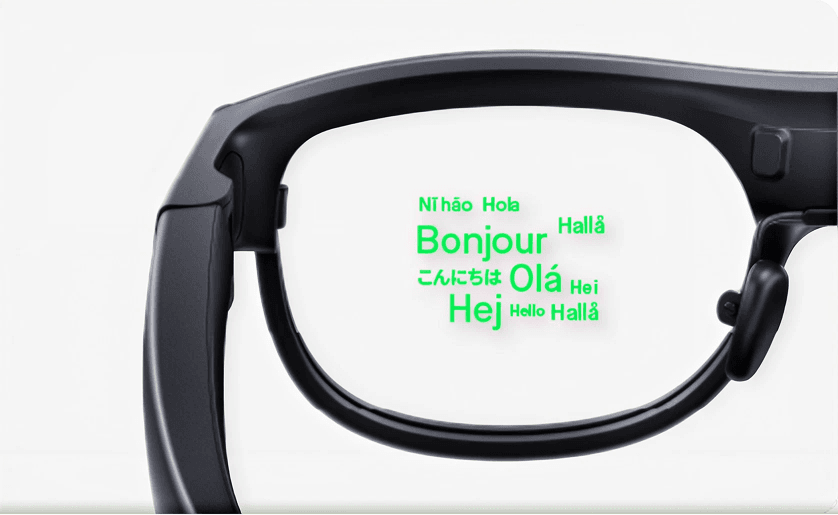
XRAI is live captioning and translation software for smart glasses, showing subtitles and translated speech in the lenses. The XRAI AR2 OS covers 300+ languages, and it runs as a layer on compatible AI glasses.
Live Captions
Speech in the room written into the wearer's view as it happens.
Live Translation
Translated speech in the lenses, with the AR2 OS covering 300+ languages.
Workplace Accessibility
Deaf and hard-of-hearing staff follow meetings without an interpreter.
Meeting Transcripts
Captioned conversation available as text for notes and follow-up.
XRAI listens to the conversation in the room and writes it into the wearer's field of view, either as captions in the same language or as translated text. That covers two jobs that are usually procured separately: accessibility, where deaf and hard-of-hearing staff and visitors follow meetings without an interpreter present, and multilingual work, where a site team, a supplier and a customer do not share a first language. Language coverage on the AR2 OS runs past 300.
Because it is a software layer, it adds captioning to AI glasses you already run rather than requiring another device. XRAI also sells its own hardware, the XRAI AR2, which we list separately in the catalog; the platform and the glasses are two different purchases and are worth keeping apart when you compare quotes.
Two practical questions decide most XRAI deployments. First, connectivity: captioning and translation lean on cloud processing for speed and accuracy, so coverage in a basement plant room is a real constraint and offline behavior needs confirming for your setup. Second, data handling, since live speech from meetings is exactly the material a works council or a DPO will ask about. We can share XRAI's data and privacy documentation so you can assess it against your own policy before signing.
We license XRAI alongside the glasses it runs on and the rest of the software range, so captions, devices and enrollment arrive as one order. Book a demo in a room with your own accents, background noise and language mix, which is a better test than a scripted one, and compare it against the other live translation software and translation glasses we supply.
XRAI provides live captions and translation in the wearer’s view, supporting accessibility for deaf and hard-of-hearing users and multilingual communication for international teams.
The XRAI AR2 OS supports more than 300 languages for translation and captioning, though available languages and features can depend on the setup.
XRAI is a captioning and translation platform for smart glasses. The XRAI AR2 OS shows real-time subtitles and translated speech in the lenses, across more than 300 languages.
Yes. Live captions help deaf and hard-of-hearing staff and visitors follow conversations hands-free, which supports accessibility and inclusion in the workplace.
XRAI suits accessibility and multilingual communication. If you need live captions or broad language translation on glasses, XRAI is a strong fit. Talk to a specialist to confirm.
On-device translation suits everyday multilingual use; XRAI suits dedicated captioning and the widest language coverage, especially for accessibility. Our specialists can advise.
VR Expert AI can recommend compatible AI glasses to pair with XRAI based on your use case, comfort and budget. Request a quote for a bundled recommendation.
XRAI runs on compatible smart glasses as a software layer. VR Expert AI can confirm which AI glasses in our range work with XRAI for your use case.
Yes. XRAI adds captioning and translation as a software layer on compatible glasses, complementing the device’s own features. Our specialists can advise on the combination.
Some captioning and translation uses cloud services for speed and accuracy. Coverage and offline options depend on the setup; our specialists can advise.
Yes. XRAI can be licensed and deployed across a team on compatible glasses. VR Expert AI can advise on licensing and rollout.
Yes. As a B2B supplier we offer volume pricing, business invoicing and quotes for pilots and rollouts, with documentation for procurement.
Data handling depends on the deployment and connectivity. Our specialists can share XRAI’s data and privacy details so you can assess them against your requirements.
XRAI software is sold as a business license or service through VR Expert AI, with volume pricing. Request a quote with your user or device count and use case and we will confirm licensing and pricing.
Yes. We can arrange a demo and, for some platforms, a proof of concept, so you can validate the software on your glasses before committing. Talk to a specialist to arrange one.